
Mouse Jiggler: keep the screen awake without touching anything
Source codeDownload v1.0.0Mouse Jiggler stops the screen going to sleep or the machine locking, by moving the mouse for you. One button to start it, another to stop it, and on with your day.

What it is for
Those stretches where the computer is working but you are not touching it: a long build, a render, a backup, a download. And also when you are at the desk but not on the keyboard — reading a long document, following a presentation, on a call where you are only listening — and the lock screen kicks in at the worst possible moment.
And, of course, to stop that green dot in Teams turning amber while you go and get a coffee. But you did not hear that from me.
Zen mode
This is what separates it from nudging the mouse every couple of minutes. In normal mode the cursor moves five pixels diagonally every ten seconds: visible, and handy for checking at a glance that it is doing its job.
In zen mode the movement is one pixel, immediately reversed. The system registers activity and resets its idle counter, but for practical purposes the cursor has not moved: you can carry on working with the app running without the pointer jumping while you are aiming at a button.
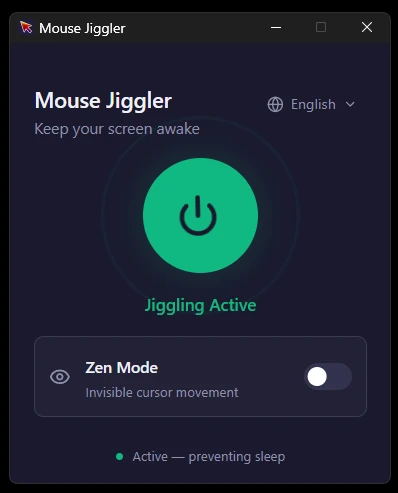
It lives in the tray
Closing the window does not quit the app: it hides to the system tray and keeps running. Right-click its icon to show it again or exit for real. And if you launch it a second time by mistake, instead of duplicating itself it brings the existing window to the front.
It detects the OS language and ships in English, Spanish, French, German and Japanese, switchable by hand at any time. The interface follows the Windows 11 Fluent look in dark.
It stays small
2 MB for the installer and about 9 MB for the standalone binary — which matters for a utility that is going to sit open in the background all day.
A note on how it is built
It is a Tauri 2 app: the logic in Rust, the interface in React with Vite and Tailwind. The movement is injected by a background thread through enigo, emitting relative mouse events every ten seconds; either mode is enough to reset the system idle timer and prevent the lock screen, the screensaver or sleep.
It is a reimagining of arkane-systems' Mouse Jiggler, written in C# and .NET, rebuilt from scratch on Rust and web tech so it takes up and uses considerably less. Windows only for now.
Support the project
Mouse Jiggler is free, carries no ads and sends nothing anywhere. If it spares you the annoyance of the screen locking mid-presentation, you can support it through GitHub Sponsors.
Source on GitHub.